My positive review of the Cronometer nutrition tracking app is based on my needs, but most of all, ease of use. I have tried a number of apps, most recently one that is hyped on social media and on health segments on news shows. My first app years ago was MyFitnessPal, which is very good, but it didn’t quite fit my personality. I decided to give Cronometer a try, and in just 24 hours, it became the blessing that I was hoping for. Scroll down to read a review of the app, and use this link to save $5.00 on Cronometer Gold.
Beyond the Calories: Why Cronometer is My Go-To Nutrition Tracker
In the crowded world of health and fitness apps, it’s easy to get lost. Calorie counters are a dime a dozen, each promising to be the key to your weight loss or muscle-building goals. But what if your goals are more nuanced? What if you’re less concerned with just calories in vs. calories out, and more interested in the actual quality of your nutrition?
If that sounds like you, allow me to introduce you to my not-so-secret weapon for nutritional deep dives: Cronometer.
For years, I’ve dabbled with various tracking apps, but now I have found Cronometer and it is the easiest to use of all of the ones that I have tried. As a data and number lover, it also goes deeper than any other platform I’ve used, transforming nutrition tracking from a simple numbers game into a powerful tool for understanding and optimizing my health.
What is Cronometer?
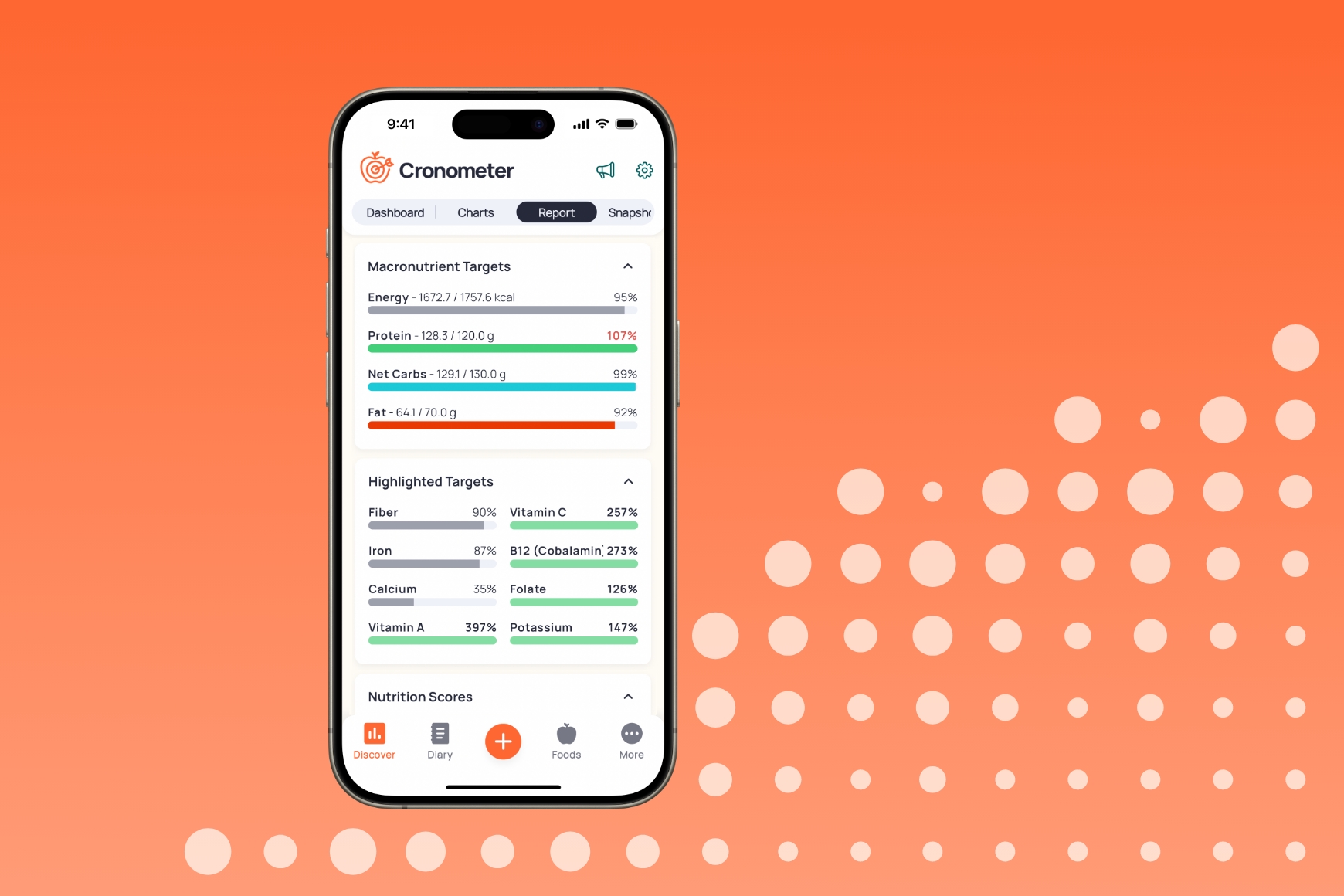
At its core, Cronometer is a food diary and nutrition tracker. You log what you eat and drink, and it calculates your intake of calories, macronutrients (protein, carbs, fat), and, most importantly, micronutrients.
And that’s where Cronometer truly shines. While most apps stop at the basic macros, Cronometer meticulously tracks up to 82 different micronutrients, including vitamins, minerals, and even individual amino acids. It’s like having a nutritionist in your pocket, providing a detailed breakdown of everything you’re consuming.
The Power is in the Details
So, why does tracking all these micronutrients matter?
- Identify Nutritional Gaps: Ever wondered if you’re getting enough Magnesium, Vitamin D, or Choline? Cronometer takes the guesswork out. Its detailed reports show you exactly where you’re hitting your targets (based on Dietary Reference Intakes or DRIs) and where you might be falling short. This insight is invaluable for preventing deficiencies and optimizing your overall well-being.
- Data You Can Trust: Accuracy is everything in tracking, and Cronometer’s database is second to none. It primarily relies on verified lab-analyzed data from sources like the USDA and NCCDB, rather than user-submitted entries which can often be inaccurate. This means you can be confident that the nutritional information for “1 medium apple” is precise.
- Unmatched Customization: Whether you’re following a ketogenic diet, going vegan, or have specific targets set by a doctor, Cronometer adapts to you. You can set custom macro and micro targets, create your own recipes with precise nutritional information, and even track biometrics like weight, measurements, and sleep.
- Visualize Your Progress: The app presents your data in easy-to-understand charts and graphs. You can see your nutrient intake over days, weeks, or months, helping you spot trends and make informed adjustments to your diet.
Is Cronometer for Everyone?
Let’s be honest, the level of detail can be a bit much if you’re just starting out and only want to track calories.
Cronometer is PERFECT for:
- The Data-Driven Individual: If you love spreadsheets, charts, and getting into the nitty-gritty of your health data, you will feel right at home.
- Those with Specific Dietary Needs: Vegans tracking iron and B12, athletes monitoring amino acid profiles, or individuals managing health conditions will find the detailed tracking indispensable.
- Anyone Focused on Nutrient Density: If your goal is to eat the most nutrient-rich diet possible, Cronometer is the ultimate tool to guide your food choices.
Cronometer might be overwhelming for:
- The Absolute Beginner: Someone who just wants a simple calorie count might find a simpler app like MyFitnessPal less intimidating at first.
- Those Looking for a Social Platform: Cronometer is more of a personal data tool than a community-focused app.
Free vs. Gold: Is the Upgrade Worth It?
One of the best things about Cronometer is that its free version is incredibly robust. You get access to the full nutrient tracking, the accurate database, and basic reporting. For many users, this is more than enough.
However, the paid “Gold” subscription unlocks some fantastic features, including:
- No Ads: A cleaner, more focused experience.
- Diary Groups: Share your food diary with a coach, nutritionist, or friends.
- Recipe Importer: Pull in recipes from websites and have Cronometer analyze them.
- Advanced Charts & Analysis: Deeper insights into your long-term trends.
- Nutrient Oracle: A tool to find foods rich in specific nutrients you might be lacking.
Whether you upgrade depends on how deep you want to go, but I highly recommend starting with the free version to see just how powerful it is.
The Final Word
If you’re ready to move beyond basic calorie counting and take true ownership of your nutritional health, you owe it to yourself to try Cronometer. It provides the clarity and insight needed to build a diet that doesn’t just help you manage your weight, but truly nourishes your body from the inside out.
Give it a try for a week. Log your food honestly and explore the nutrient reports. You might be surprised by what you discover.